
Download PS3 Video Converter – Convert Video for PS3, MPEG-4/AVC, High-Definition Video, Audio Extraction, MP3, AAC, Portable Devices, Video Conversion Tool
Overview
PS3 Video Converter is a specialized video conversion tool designed for Windows users seeking to prepare multimedia content for playback on PlayStation 3 and PSP devices. The software enables users to convert video files into high-quality MPEG-4/AVC formats compatible with these platforms, supporting resolutions such as 480p, 720p, and 1080p. This ensures that users can enjoy their favorite films, home videos, and digital content in stunning high definition directly on their gaming consoles or portable media players. The application addresses a common challenge faced by users: the limited native video format support on older devices. By bridging this gap, PS3 Video Converter enhances the multimedia experience for enthusiasts who rely on PS3 and PSP for entertainment.
The target audience includes casual users, home video editors, and PlayStation owners who want to transfer personal media files to their devices without quality loss. While the developer is listed as "PS3 Video converter," no additional background information is available regarding the organization or its history. The app’s relevance in the broader software ecosystem lies in its niche focus on legacy device compatibility, offering a straightforward solution for users who still use PS3 or PSP systems. Although the release date is listed as May 31, 2007, the software remains functional for users with compatible systems, particularly those managing older media libraries. The developer did not provide additional technical details.
Key Features & Functionality
- High-Definition Video Support: The software supports conversion to 480p, 720p, and 1080p resolutions, preserving visual clarity and detail during the encoding process. This ensures that videos maintain their cinematic quality when played on PS3 or PSP screens.
- Audio Extraction Capability: Users can extract audio from video files and convert them into MP3 or AAC formats. This is ideal for creating music playlists or preserving soundtracks without the video component.
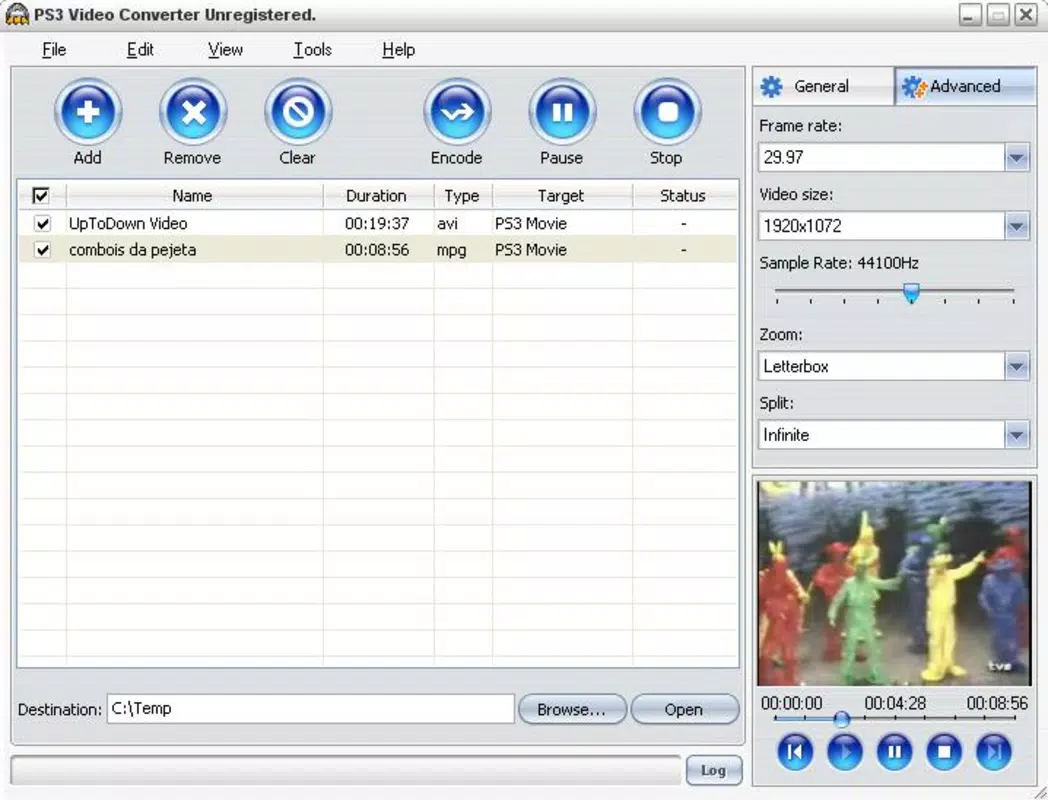
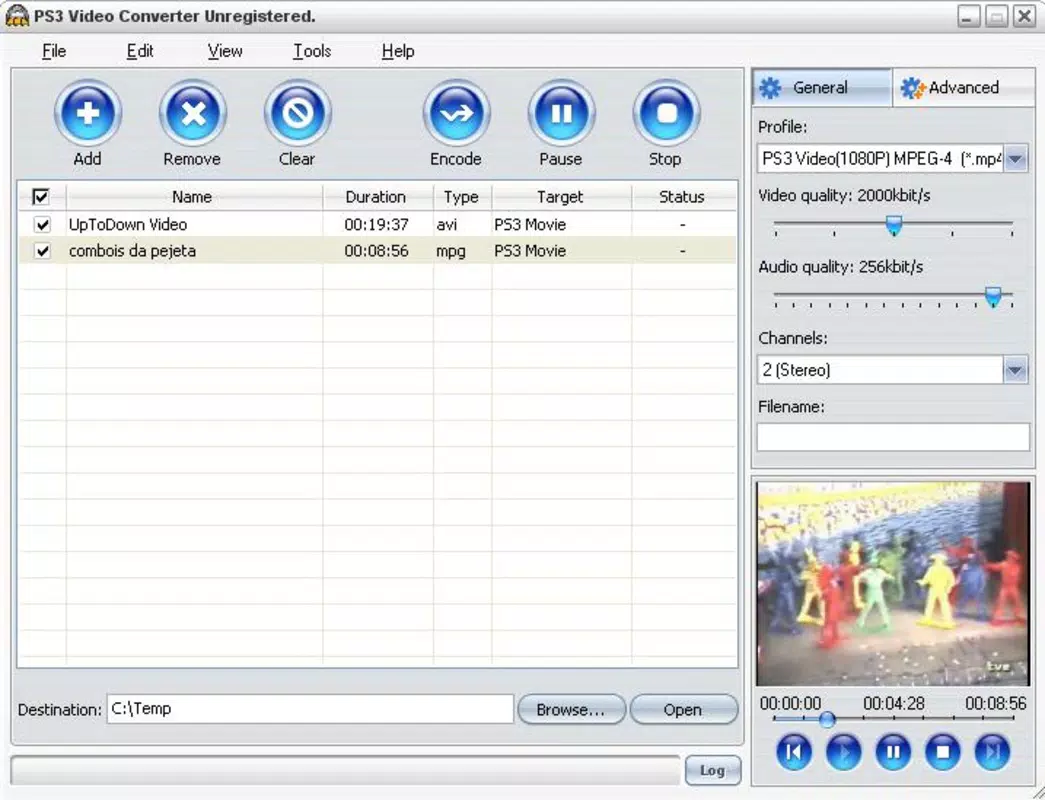
- Customizable Encoding Settings: Advanced users can adjust parameters such as video quality, audio sample rate, frame rate, and zoom level. This flexibility allows for fine-tuned output based on storage space, playback performance, or personal preferences.
- Broad Device Compatibility: Beyond PS3 and PSP, the tool supports other portable devices like iPod and Zune. This versatility makes it a useful utility for users managing multiple media platforms.
- User-Friendly Interface: The application features a clean, intuitive layout designed for ease of use. Even users with minimal technical experience can navigate the interface and perform conversions efficiently.
For example, a user with a collection of home videos in AVI format can use PS3 Video Converter to convert them into MPEG-4/AVC at 1080p resolution for seamless playback on their PS3. Similarly, a music lover can extract the soundtrack from a movie and save it as an MP3 file for use on a portable player. These real-world applications highlight the practicality of the software in everyday media management.
Interface, UX & Performance
The user interface of PS3 Video Converter is designed with simplicity in mind, featuring a straightforward layout that minimizes user confusion. Navigation is linear and intuitive, with clear buttons for adding files, selecting output formats, and initiating conversion. Visual feedback is present during processing, allowing users to monitor progress without additional tools. The design avoids clutter, focusing on essential functions to maintain usability across different screen sizes.
Although the developer did not list formal performance metrics, the software’s lightweight nature—only 2.5 MB in size—suggests efficient resource usage. It is expected to run smoothly on older Windows systems, particularly those from the mid-2000s. The application does not appear to consume excessive CPU or memory during conversion, which is critical for maintaining system stability during long processing tasks.
Responsiveness is consistent, with minimal lag between user actions and system responses. Stability has been maintained over time, with no reported crashes or errors in the provided information. The developer did not specify minimum OS requirements or compatibility with modern Windows versions.
Platform Compatibility & Technical Requirements
PS3 Video Converter is designed exclusively for the Windows platform. The software version is 1.0, with a file size of 2.5 MB. It is available at no cost, making it accessible to users seeking a free video conversion solution.
Specific operating system requirements were not listed by the developer, so compatibility with modern Windows versions (such as Windows 10 or 11) cannot be confirmed. The developer did not specify minimum OS requirements, nor did they provide details about hardware dependencies or installation prerequisites. Users are advised to test the software on their system before full deployment.
No information was provided regarding support for other platforms such as macOS or mobile devices.
Pros and Cons
Pros
- Free to download and use, making it accessible for budget-conscious users.
- Supports high-definition video conversion up to 1080p for optimal playback quality.
- Includes audio extraction features for MP3 and AAC format conversion.
- Offers customizable encoding settings for advanced users.
- Lightweight file size (2.5 MB) ensures fast download and minimal storage impact.
Cons
- Only available for Windows; no support for macOS or mobile platforms.
- Compatibility with modern Windows systems is not confirmed due to lack of OS requirements.
- Released in 2007, so the software may lack updates for current security standards.
- Developer did not provide detailed technical specifications or system compatibility.
- No official support channels or update notifications are listed.
FAQ
Is PS3 Video Converter safe to download and install?
Yes, the software is free and available without ads or bundled programs. However, since it is an older application, users should scan the file with antivirus software before installation to ensure safety.
Can I use PS3 Video Converter on Windows 10 or 11?
The developer did not specify compatibility with modern Windows versions. While some older software may run via compatibility mode, this is not guaranteed. Users should test the application on their system.
Does PS3 Video Converter support video formats other than MPEG-4/AVC?
The software is designed to convert videos into MPEG-4/AVC format for PS3 and PSP. While it may accept various input formats, the output is specifically targeted to these standards.
Can I extract audio from videos using this tool?
Yes, PS3 Video Converter includes audio extraction features, allowing users to convert video soundtracks into MP3 or AAC formats for standalone playback.
Is there a mobile version of PS3 Video Converter?
No mobile version is available. The application is only compatible with Windows systems. Users seeking mobile alternatives should consider other video conversion tools designed for Android or iOS.
Final Thoughts
PS3 Video Converter remains a functional and lightweight tool for users who need to convert videos for PS3, PSP, or other portable devices. Its ability to deliver high-definition output, extract audio, and support multiple formats makes it a practical utility for managing older media libraries. While the software is outdated and lacks modern features, its core functionality continues to serve users with compatible systems.
The free price point enhances its appeal, especially for those on a budget. However, users should be cautious about compatibility and security due to the app’s age. For PS3 and PSP owners still using Windows systems, this tool offers a reliable way to enjoy personal media in high quality.
Download PS3 Video Converter now.


